
Warranty & RMA Policy
Dear Customers:
Thank you for purchasing TP-Link products. In order to protect your rights and interests, please read the following Warranty Policy carefully. NOTE: THIS WARRANTY POLICY GIVES YOU SPECIFIC LEGAL RIGHTS, AND YOU MAY ALSO HAVE OTHER RIGHTS WHICH VARY FROM STATE TO STATE.
Limited Warranty
TP-Link USA Corporation (“TP-Link USA”) provides a limited warranty on all eligible TP-Link products purchased in the United States. This limited warranty covers failures due to defects in material or workmanship for devices, antennas, and accessories*, commonly referred to as “manufacturer defects.” Packaging, software products, and technical data are not covered under the limited warranty. The maximum liability of TP-Link USA is the product purchase price.
Coverage under this limited warranty begins from the date the original purchase is delivered and is only applicable to the original purchaser of the product. Second-hand goods, such as products sold as “used,” “as is,” or “open box”, are generally not covered under this limited warranty. A valid proof of purchase and a complete product serial number are required to receive any services guaranteed as part of this limited warranty. This limited warranty does not apply if the product has been modified in any way or has a defaced or removed serial number.
This limited warranty does not apply to refurbished products or products resold by unauthorized resellers. Products sold by unauthorized resellers are considered second-hand goods and do not qualify for warranty services. For TP-Link Refurbished Product Warranty Policy, please visit http://www.tp-link.com/us/support/refurbished/
TP-Link USA’s limited warranty does not provide refunds, returns, or exchanges under most conditions. Product(s) replaced under this limited warranty are typically replaced with factory refurbished product(s). If the defective product(s) are discontinued, end-of-life, or out of stock, TP-Link USA, at its discretion, will issue a replacement product with comparable features. This may result in a replacement product that is a different model or value. Product warranty periods are not renewed or extended for any replacement products provided under this warranty policy. The original purchase date and warranty period will apply to any replacement products until the end of the original warranty period.
Conditions that Disqualify Products from the Limited Warranty
Conditions that disqualify products from the limited warranty include, but are not limited to:
- Any defects or damages caused by normal wear and tear, accidents, improper installation or maintenance, misuse (including failure to follow product documentation), neglect, disassembly, alterations to the hardware or supporting setting files, servicing other than by TP-Link USA authorized technicians, and external causes such as, but not limited to, natural disaster, water damage, extreme thermal or environmental conditions
- Any defects caused by software, virus, or improper use of self-made, non-public or third-party/open-source software
- Any unauthorized obliteration or tearing up of the product barcode
- Any defects caused by transportation or loading during returning voyage
- Any other defects that are not caused by workmanship or product quality
For external power supplies, conditions that disqualify products from the limited warranty include, but are not limited to:
- Returned power supply units that have obvious hard object damage, fissure, broken legs and/or severe deformation;
- Returned power cord that is broken, has an exposed core or similar damages.
*Accessories: Please refer to TP-Link Home Accessories and TP-Link Business Accessories for the applicable Warranty Period.
Warranty Period
Warranty periods for TP-Link products purchased on or before 8/31/2023 can be viewed here.
Warranty periods for TP-Link products purchased on or after 9/1/2023 are as follows:
| Products Category | Products in Category | Warranty Period |
| Home | Whole Home Wi-Fi/Mesh Wi-Fi /Deco | 2 Years |
| Wi-Fi Router | ||
| Adapters/USB Adapters | ||
| Access Points | ||
| Range Extenders | ||
| Powerline Adapters | ||
| Smart Home | Smart Plugs | 2 Years |
| Smart Lighting | ||
| Smart Switches | ||
| Indoor/Outdoor Wired Cameras | ||
| Smart DoorBell | Wired Doorbell *Excluding KD110 | 1 Year |
| Wire-Free Doorbell | ||
| Wire-Free Cameras | Wire-Free Smart Cameras | 1 Year |
| *Excluding KC300 and KC310 | ||
| Solar Charging Panel | Solar Charging Panel (for Wire-Free Cameras) | 1 Year |
| Battery (Removable/Pack) | Wire-Free Camera Battery | 1 Year |
| Baby Monitor | Baby Monitors | 1 Year |
| Flood Lighting | Smart Flood Lights | 1 Year |
| Smart Flood Light Cameras | ||
| Robot Vacuums | Robot Vacuums | 1 Year |
| *Excluding wear and tear items that require regular replacement and maintenance | ||
| Robot Vacuum Accessories | Brushes, Mop Pads, Filters, Boundary Tape | 30 Days* |
| Smart Sensor | Sensors | 1 Year |
| Smart Home Hub | ||
| Smart Button | Smart Button | 1 Year |
| Home Class Accessories | USB Hubs/Port Hubs | 2 Years |
| USB Converters/USB to Gigabit Ethernet Adapter | ||
| Charging/Power Bank | 1 Year | |
| USB-F Bluetooth power cable | ||
| TP-Link Omada Pro SDN | TP-Link Omada Pro Switches | Limited Lifetime |
| TP-Link Omada Pro Access Points | ||
| TP-Link Omada Pro VPN Routers | ||
| TP-Link Omada Pro Controllers | ||
| TP-Link Omada SDN | TP-Link Omada Switches *Excluding Outdoor Switches | 5 Years |
| TP-Link Omada VPN Routers | ||
| TP-Link Omada Controllers | ||
| TP-Link Omada Access Points *Excluding Outdoor Access Points | ||
| TP-Link Omada Outdoor Switches | 2 Years | |
| TP-Link Omada Outdoor Access Points | ||
| PharOS Outdoor Access Points | PharOS WISP/Long Range outdoor access points | 2 Years |
| Business-Class Switches (Non-TP-Link Omada) | w/ Steel Chassis | 3 Years |
| w/ Plastic Chassis | 2 Years | |
| LiteWave Switches | w/ Steel Chassis | 3 Years |
| w/ Plastic Chassis | 2 Years | |
| Business Class Accessories | Splitters and Injectors | 2 Years |
| Media Converters | ||
| Transceivers | ||
| SFP+ Cables | ||
| Rackmount Chassis | ||
| Rack Mounting kit | ||
| TP-Link ViGi Surveillance | VIGI camera with metal chassis *excludes Pan & Tilt | 5 Years |
| VIGI camera with plastic chassis *excludes Pan & Tilt | 2 Years | |
| VIGI Pan & Tilt Camera | 2 Years | |
| VIGI NVR *excludes Hard Drives | 5 Years | |
| VIGI NVR Hard Drives | 3 Years | |
| TP-Link Optical Networking | ONU | 2 Years |
| Transceivers | 2 Years | |
| OLT and Line Card | 5 years | |
| TP-Link Festa | Routers w/ steel chassis | 3 Years |
| Outdoor Access Points | 2 Years | |
| Indoor/Wall Access Points | 3 Years | |
| Switch w/ steel chassis | 3 Years | |
| Switch w/ plastic chassis | 2 Years |
*Note:
Vacuum accessories are components that experience natural wear and tear over time requiring periodic replacement. The warranty for these products solely covers manufacturing defects, such as sizing or fitting issues making them unsuitable for their intended use. Normal wear and tear, along with other defects not resulting from manufacturing, are not covered under the warranty.
Click here to determine what category your product is in.
*Limited Lifetime Warranty:
A: Limited lifetime warranties only apply to the original purchaser and do not transfer. Second-hand business-class products or products sold by unauthorized resellers do not carry a limited manufacturer warranty. RMA requests for such products will be denied.
B: Warranties on products that are discontinued/end-of-life will be limited to a period of (5) years from the end-of-life date, as set by TP-Link USA. Discontinued status is based on the model number and not the hardware revision.
C: Only the product and its internal parts are covered under the limited lifetime warranty. External parts such as external power supplies, modules, and other accessories may be covered under separate warranties. Please refer to TP-Link business-class accessories for more information.
Replacement Procedure
If the product(s) are found to be defective and is still covered under the TP-Link USA replacement and warranty policy, the customer may qualify for a replacement product, by following the process listed below:
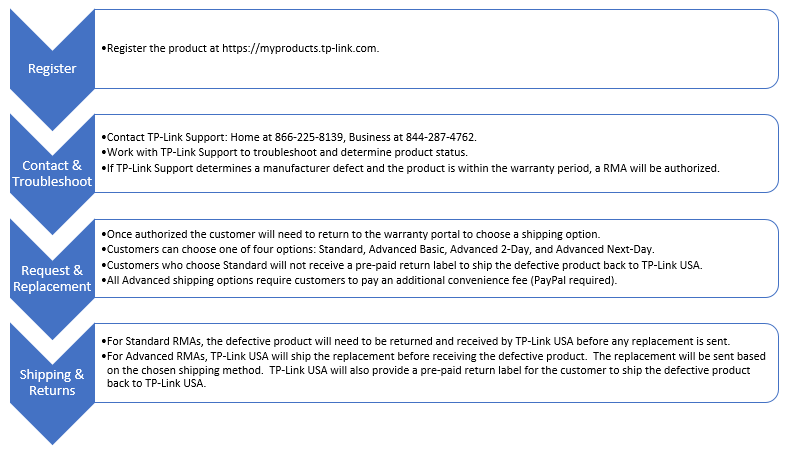
Click here to view the detailed TP-Link RMA Process
Please Note:
- TP-Link USA may reject or return the product(s) returned without accessories or an assigned case number.
- Serial numbers not in our database may have warranty services denied.
- Products with no valid proof of purchase and where a serial number cannot be determined may have warranty services denied.
- Advanced shipping times only apply to the transit of the replacement. All RMAs regardless of chosen method are subject to a processing period of up to 3 to 5 business days. The chosen method of delivery will be applied once the product has shipped.
- TP-Link USA is not responsible for any damage that may occur during shipping.
- TP-Link USA is not responsible for packages that are reported lost, missing, or stolen. If our shipping partner shows the package was delivered to the correct address, additional replacements may be denied and will only be approved at TP-Link USA’s discretion.
- If the defective product is not received complete (unit, power cord/controller, antennas, etc.), RMA services may be denied and what was received returned to the customer.
- If a damaged product is received as part of an RMA replacement the RMA will be denied and the product disposed of unless the customer provides a return label to ship the product back to them.
- Individual parts such as (screws, zip-ties, wire nuts, ethernet cables, etc.) are not covered under the product’s limited warranty and may only be provided at TP-Link’s sole discretion.
- Customers will be responsible for additional shipping costs for the return of missing items from defective products that were received incomplete.
- Fees charged to customers who have selected an Advanced RMA option for failing to return defective products within the specified time are non-refundable.
Appendix:
- THE LIMITED WARRANTY STATED ABOVE IS ONLY VALID FOR PRODUCTS SOLD IN THE U.S. BY TP-LINK OR ITS AUTHORIZED RESELLERS. ANY ADDITIONAL WARRANTY OR SERVICES AGREED UPON DURING THE PURCHASE SHALL ONLY BE EFFECTIVE BASED ON THE CONTRACT SIGNED BY TP-LINK USA. ADVANCED SHIPPING OPTIONS ARE ONLY AVAILABLE IN THE CONTIGUOUS 48 STATES.
- WARRANTY SERVICES MADE AVAILABLE BY DISTRIBUTORS ARE NOT COVERED BY THIS WARRANTY POLICY, AND TP-LINK USA SHALL NOT BE HELD LIABLE FOR ANY SUCH WARRANTY SERVICE. IN ORDER TO RECEIVE ANY BENEFIT FROM THE DISTRIBUTOR’S WARRANTY AND/OR OTHER POLICIES, PLEASE KEEP ANY DOCUMENTS OBTAINED DURING THE PURCHASE.
- NO EMPLOYEE OR REPRESENTATIVE OF TP-LINK USA OR ITS AFFILIATES OR ANY THIRD PARTY IS AUTHORIZED TO MAKE ANY MODIFICATIONS, EXTENSIONS, OR ADDITIONS TO THIS WARRANTY POLICY. IF ANY TERM OF THIS WARRANTY POLICY IS HELD TO BE ILLEGAL OR UNENFORCEABLE, THE REMAINING TERMS OF THIS WARRANTY POLICY WILL REMAIN IN FULL FORCE AND EFFECT.
- TO THE MAXIMUM EXTENT PERMITTED BY APPLICABLE LAW, THE LIMITED WARRANTY WRITTEN ABOVE IS THE ONLY EXPRESS WARRANTY TP-LINK USA PROVIDES FOR THE APPLICABLE TP-LINK PRODUCTS, AND THE ABOVE REMEDY IS YOUR SOLE REMEDY. TP-LINK USA EXPRESSLY DISCLAIMS ALL OTHER WARRANTIES AND CONDITIONS OF ANY KIND, WHETHER STATUTORY OR IMPLIED, ARISING FROM THE COURSE OF CONDUCT OR OTHERWISE, REGARDING THE APPLICABLE TP-LINK PRODUCTS, EXCEPT THAT ANY IMPLIED WARRANTIES OF MERCHANTABILITY, FITNESS FOR A PARTICULAR PURPOSE, AND NON-INFRINGEMENT ARE LIMITED IN DURATION TO THE APPLICABLE WARRANTY PERIOD STATED ABOVE. CUSTOMER ASSUMES ALL RISK WHATSOEVER AS TO THE RESULT OF THE USE OF THE PRODUCTS PURCHASED, WHETHER USED SINGULARLY OR IN COMBINATION WITH ANY OTHER PRODUCTS OR SUBSTANCES.
- YOU EXPRESSLY UNDERSTAND AND AGREE THAT, TO THE MAXIMUM EXTENT PERMITTED BY APPLICABLE LAW, TP-LINK USA AND ITS SUBSIDIARIES AND AFFILIATES (COLLECTIVELY, "TP-LINK PARTIES") SHALL NOT BE LIABLE TO YOU UNDER ANY THEORY OF LIABILITY (WHETHER CONTRACT, TORT (INCLUDING NEGLIGENCE) OR FAILURE OF ANY WARRANTY OR OTHERWISE) FOR ANY INDIRECT, INCIDENTAL, SPECIAL, CONSEQUENTIAL, OR EXEMPLARY DAMAGES THAT MAY BE INCURRED BY YOU IN CONNECTION WITH ANY TP-LINK PRODUCTS OR THESE TERMS, INCLUDING ANY LOSS OF DATA, WHETHER OR NOT A TP-LINK USA PARTY OR ITS REPRESENTATIVES HAVE BEEN ADVISED OF OR SHOULD HAVE BEEN AWARE OF THE POSSIBILITY OF ANY SUCH LOSSES ARISING.
- TP-LINK IS NOT RESPONSIBLE FOR ANY DAMAGES, INJURIES, OR LOSS OF USE DIRECTLY OR INDIRECTLY FROM THE USE OR ATTEMPTED USE OF TP-LINK PRODUCTS AND SERVICES. YOU EXPRESSLY AGREE AND UNDERSTAND THAT TP-LINK PRODUCTS ARE USE AT YOUR OWN RISK
- SOME STATES DO NOT ALLOW LIMITATIONS ON HOW LONG AN IMPLIED WARRANTY LASTS, OR THE EXCLUSION OR LIMITATION OF INCIDENTAL OR CONSEQUENTIAL DAMAGES, SO THE ABOVE LIMITATION OR EXCLUSION MAY NOT APPLY TO YOU.
Remarks: TP-Link USA reserves the right, at its sole discretion, to interpret, modify, and amend this warranty policy at any time.